AI Capitalization, Find the Past Black Sea Projects Worth Building On
AQUA-SMART Product Team, e-AQUAF Project (BSB01009)
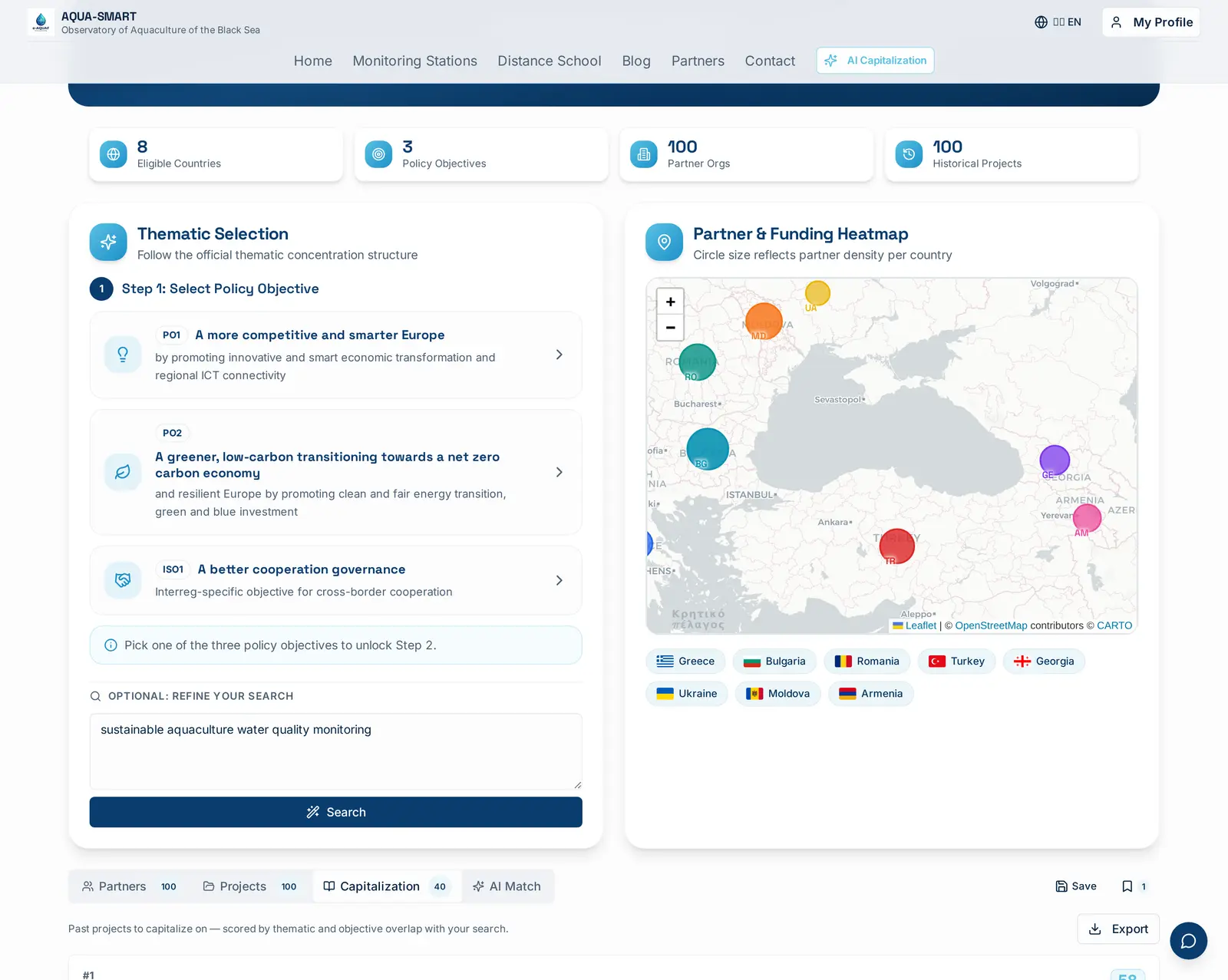
The Problem Capitalization Solves
Every Interreg call asks the same hard question: "How are you building on what's already been done?" Programme officers want to see that your proposal capitalizes on previous results, that you've read the relevant ENPI 2007–2013, ENI 2014–2020 and Interreg NEXT 2021–2027 projects, that you understand their outputs, and that you're not paying twice for work the Black Sea Basin Programme has already paid for.
In practice, doing that search by hand is brutal. The Black Sea Basin Programme has funded hundreds of projects across three programming periods. Their objectives and results are buried in PDFs and project sheets, often in inconsistent formats. Before AQUA-SMART, the realistic workflow was: open the programme database, skim acronyms, hope you spot something familiar.
AI Capitalization is our answer. You describe your idea, a paragraph, a few keywords, even a rough draft of a concept note, and the platform returns a ranked list of past projects worth capitalizing on, with the exact evidence highlighted.
How It Works
The engine sits on the Search Results page (and inside the Proposals workspace as a sidebar widget). It's wired to the same indexed project database that powers Partner Matching and AI Match, over a thousand structured project records with parsed titles, acronyms, programme period, budget, dates, objectives, results and thematic tags.
The pipeline runs in five steps:
- AI keyword expansion. Your free-text query is sent to Gemini 3 Flash, which returns the underlying intent plus a clean set of search terms. For "sustainable aquaculture water quality monitoring" the model expanded it to: aquaculture, water quality monitoring, sustainable fisheries, marine environment, pollution control, environmental monitoring, water management, blue economy. Those chips are editable, remove one to drop it from the scoring, paste your own.
- Database recall. We fetch up to 200 candidate projects whose title or objectives contain at least one of the top terms. This is a fast Postgres
ilikeOR-query, keeping the first stage free to run on every search. - Keyword relevance scoring. Each candidate is scored 0–100 across four signals:
- Title match (up to 20 pts), exact terms in the project title
- Objectives match (up to 30 pts), strongest signal, weighted highest
- Results match (up to 25 pts), what the project actually delivered
- Thematic tags (up to 15 pts), RSO codes, programme priorities, topic chips
- Acronym bonus (up to 10 pts), known flagship acronyms get a small editorial boost
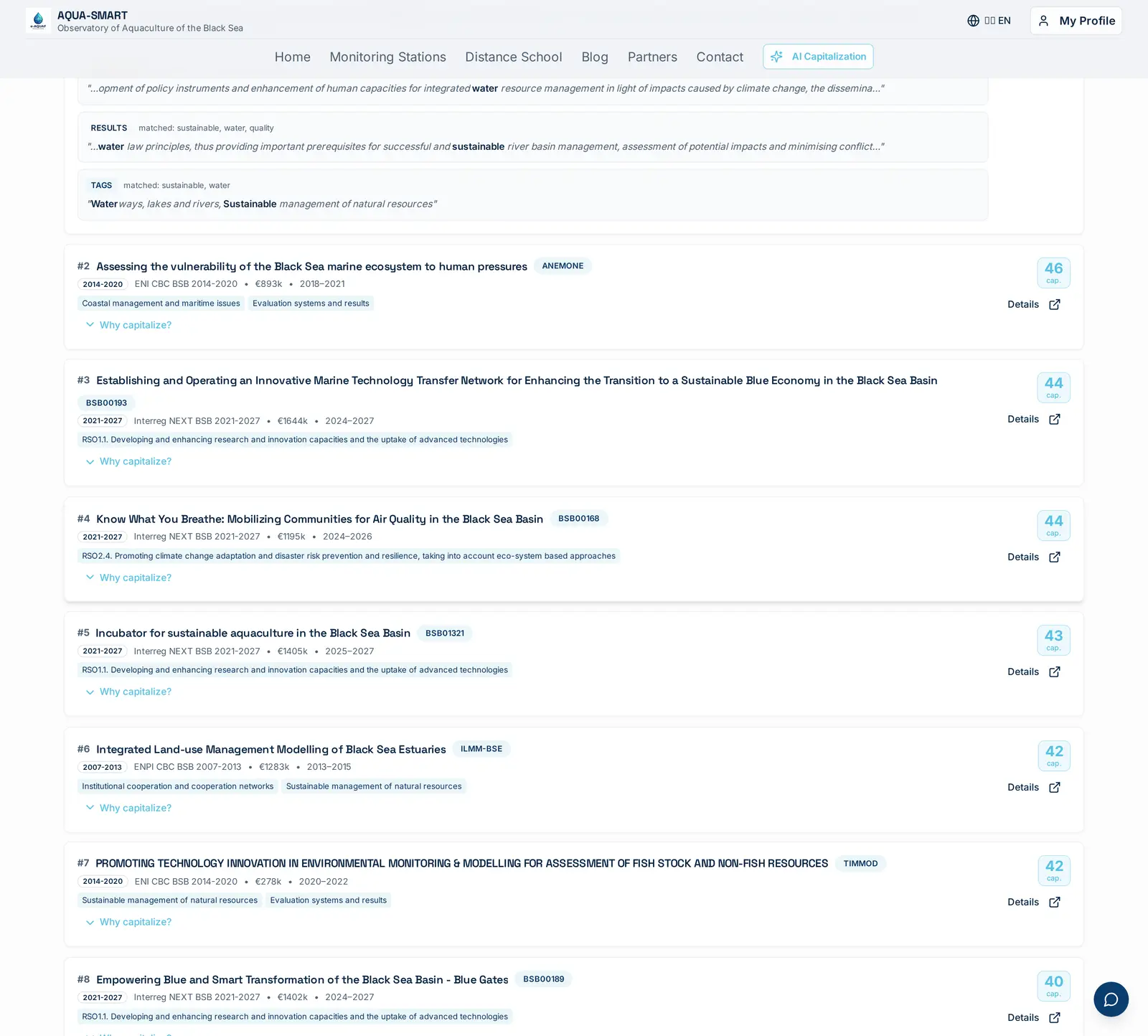
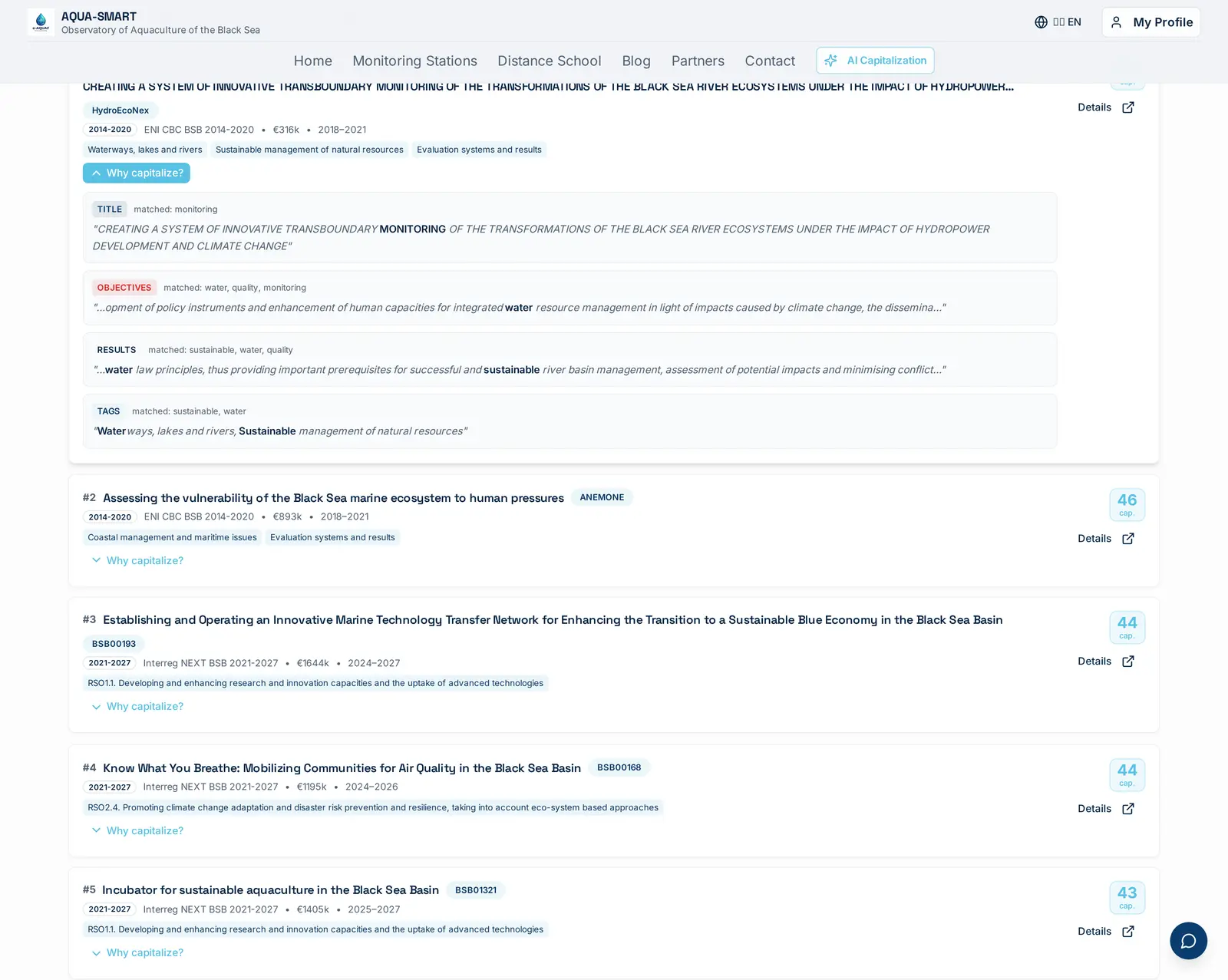
- Evidence extraction. For every signal that fired we store the exact 160-character window around the first match. That's what the "Why capitalize?" drawer shows, quoted text, with the matched words bolded.
- Semantic re-ranking. A second pass runs on the top 50 keyword matches using 768-dimensional embedding cosine similarity (Gemini Embedding). This catches projects that use different vocabulary for the same concept, "oxygenation" vs "aeration", "RAS" vs "recirculating aquaculture system". The final score is a weighted blend: 60% keyword score + 40% semantic score.
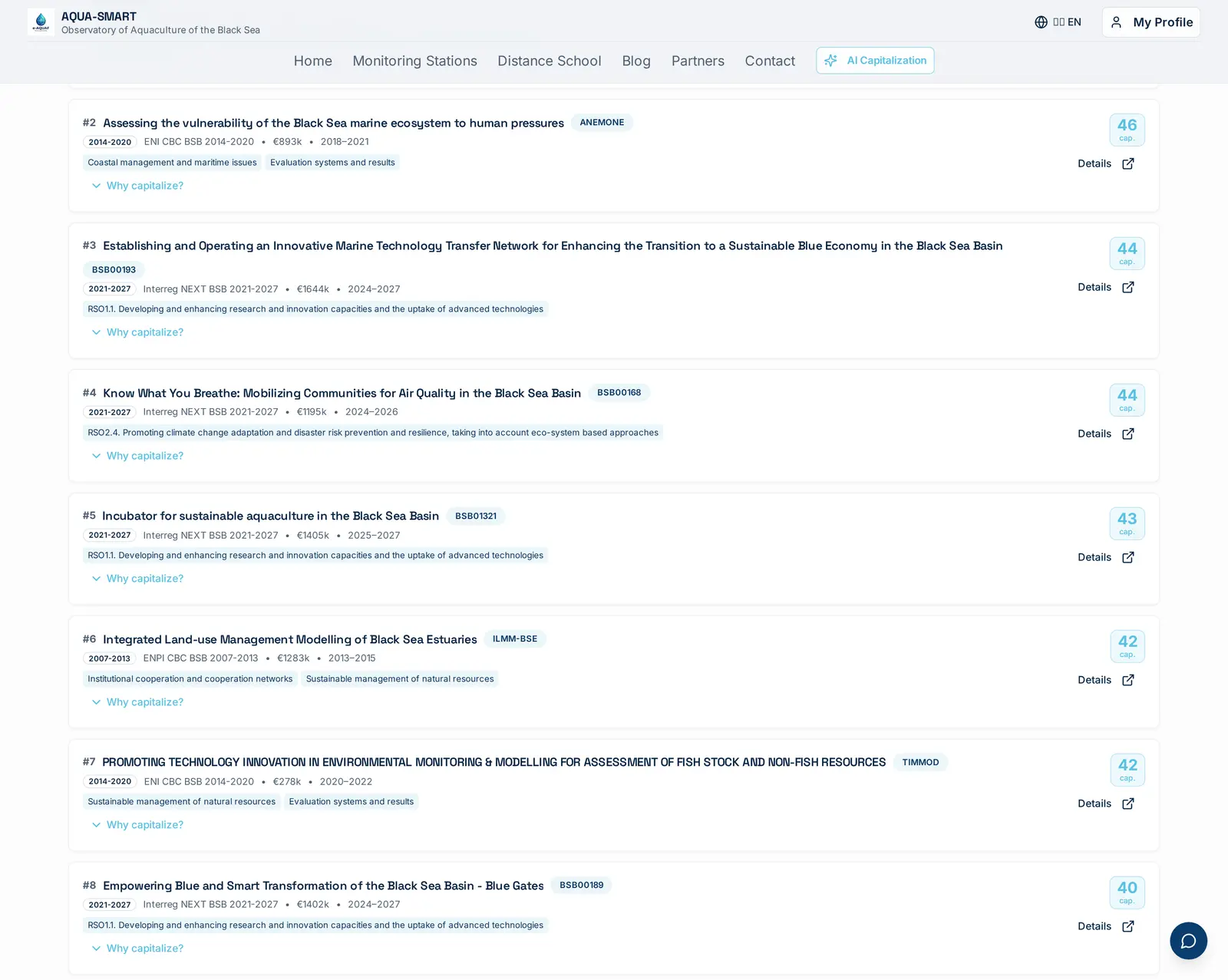
Reading a Capitalization Card
Each result is a compact card with five things you can act on:
- Rank + capitalization score, the prominent number on the right (0–100). Above 70 is a strong fit; 40–69 is worth a read; below 40 is usually thematic-tag overlap only.
- Programme period badge, 2007-2013, 2014-2020 or 2021-2027. Use the filter dropdown above the list to scope to a specific period, useful if the call requires building on Interreg NEXT 2021–2027 results specifically.
- Budget and dates, quick eligibility check for capitalization rules (most programmes only allow capitalization on closed projects).
- Theme tags, RSO codes and topic chips already on the project record.
- Why capitalize? drawer, the differentiator. Expanding it shows TITLE / OBJECTIVES / RESULTS / TAGS evidence blocks with the real sentence from the past project, matched words highlighted. When semantic re-ranking boosted a project, a SEMANTIC chip appears explaining that embedding similarity caught a conceptual match beyond exact keyword overlap. Copy a snippet straight into your concept note's "Capitalization on previous projects" section.
Filter & Sort
The bar above the list gives you four levers:
| Lever | Use it when |
|---|---|
| Programme period filter | The call mentions a specific programming generation, or you only want to capitalize on completed work |
| Sort by score (high → low) | Default, surface the strongest matches first |
| Sort by date (newest first) | You want the most recent state-of-the-art; older results may be obsolete |
| Sort by budget (high → low) | Looking for flagship reference projects to anchor your proposal |
Right under the tab strip a small line tells you how many of the total scored results survive the current filter, e.g. "Showing 20 of 55 projects (Interreg NEXT BSB 2021-2027)". When semantic re-ranking has been applied, a sparkle badge appears next to the count: "Semantic re-rank applied".
Semantic Re-Ranking
Keyword matching is fast and interpretable, but it misses conceptual neighbours. A project about "aeration systems for fish farms" won't score highly against a query containing "oxygenation", even though the concepts are identical.
Semantic re-ranking fixes this. After the keyword stage returns its top 50 candidates, we:
- Embed the user's query (title + objectives + keywords, up to 3,500 characters) into a 768-dim vector via Gemini Embedding.
- Embed each candidate project's full text (title + objectives + results) into the same vector space.
- Compute cosine similarity between the query vector and each project vector.
- Blend: final score = 0.6 × keywordScore + 0.4 × semanticScore.
When a project's semantic score is more than 15 points higher than its keyword score, a SEMANTIC chip is injected at the top of its evidence drawer, so you know the AI found a conceptual match that exact-term search would have missed.
The re-rank is best-effort: if the embedding service is unavailable, you still get the full keyword-scored list. Nothing breaks; the badge simply doesn't appear.
AI Typo Correction, Never Get Zero Results Because of a Typo
Search is unforgiving by default: type "aquauculture" instead of "aquaculture" and a pure ilike keyword query happily returns zero results. That's a terrible experience for a tool that's supposed to surface a thousand past projects. So we built a lightweight AI spell-correction stage that runs before the keyword search.
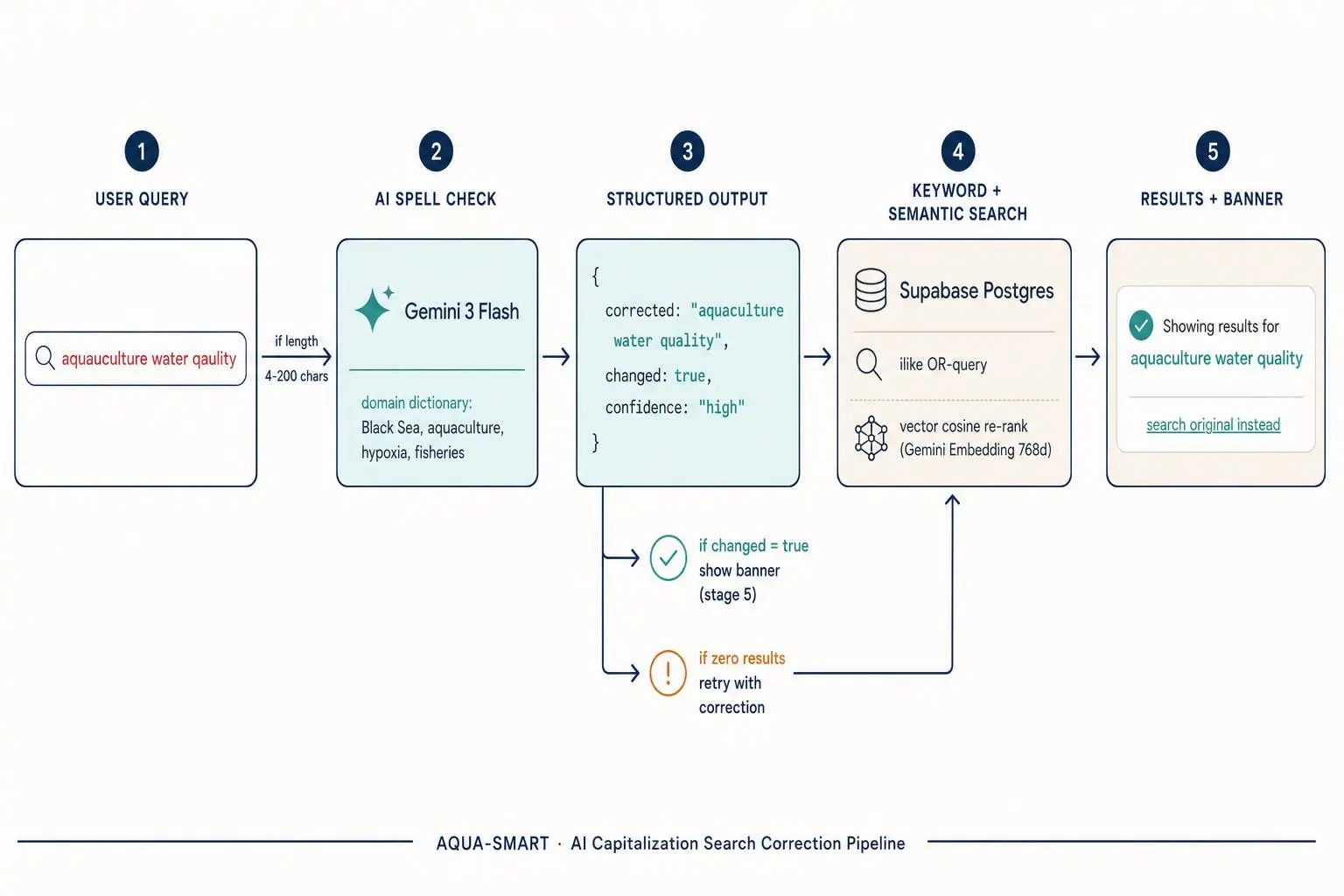
When you submit a query, the platform sends it to Gemini 3 Flash through the AQUA-SMART AI Gateway with a tight system prompt scoped to the domain, Black Sea, aquaculture, fisheries, hypoxia, microplastics, Interreg, ENI CBC, and so on, plus the themes already pinned to your proposal. The model returns a structured tool-call response: { corrected, changed, confidence }. If changed is true and confidence is high or medium, the corrected query is used for the keyword + semantic stages, and a subtle banner appears above the results:
Showing results for aquaculture water quality. Search instead for: aquauculture water qaulity
One click on the "search original instead" link reruns the search with your literal input, so you're always in control. The correction is also a safety net for the zero-results case: if the keyword stage returns nothing and no correction was attempted yet, the engine automatically runs the correction and retries once before showing the empty state. In practice this means typos almost never surface as zero results anymore.
The corrector is cached per-session, only runs on queries between 4 and 200 characters, and falls back to the original query whenever the AI gateway is rate-limited or unavailable, so it never blocks the search, it only ever improves it.
The same correction stage is now wired into the Smart Search bar on the main Search Results page, not just the Capitalization sidebar, so the entire AQUA-SMART search experience inherits the same forgiveness.
Full Hybrid Search, Everywhere, Not Just Capitalization
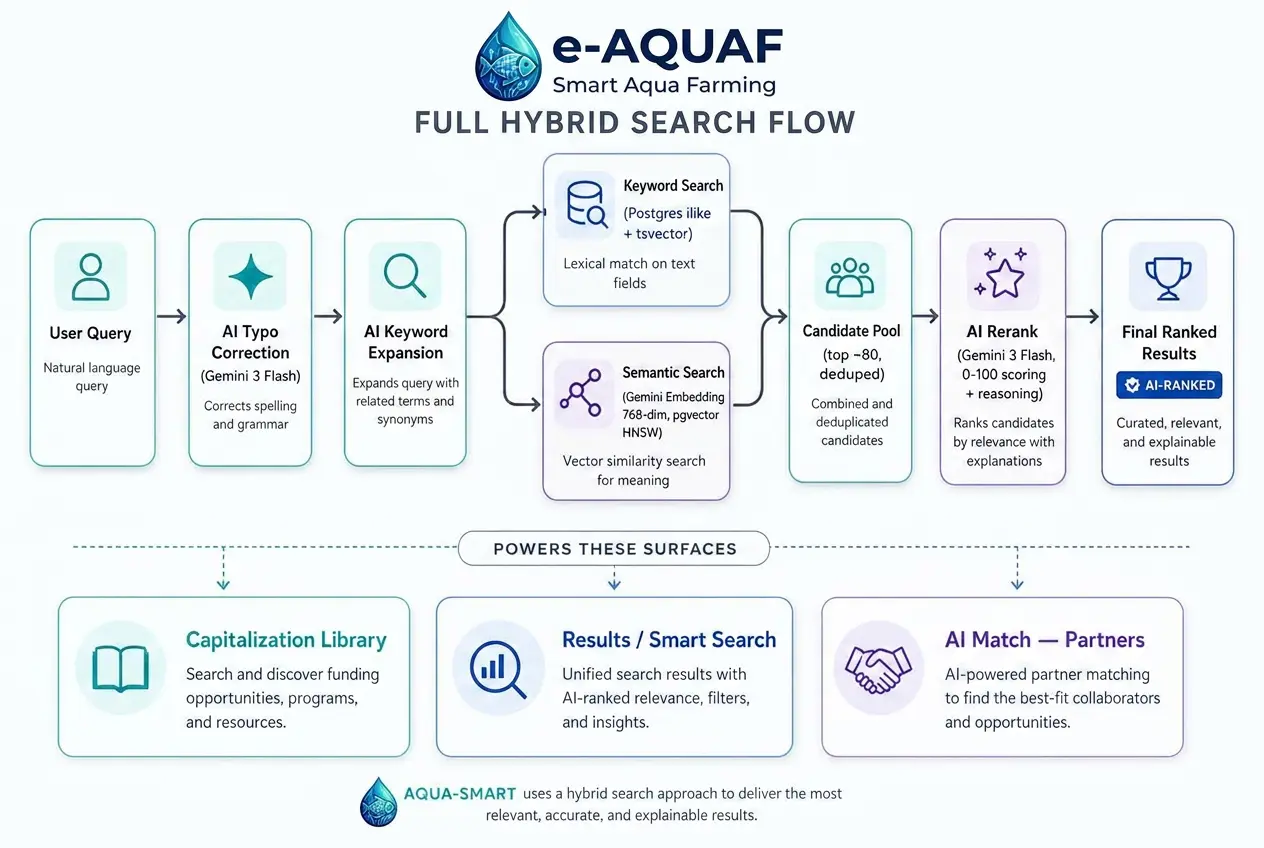
The hybrid pipeline we built for Capitalization (typo correction → keyword recall → semantic re-rank) used to live only on that one tab. It now powers every search surface in the platform: the Capitalization library, the main Results / Smart Search page, and AI Match for partner ranking inside the Proposals workspace. Same engine, three different front-ends.
The unified pipeline runs in five stages:
- AI typo correction (Gemini 3 Flash) cleans the raw query against a Black Sea Basin domain vocabulary.
- AI keyword expansion (Gemini 3 Flash) turns messy paragraphs or rough notes into 5–10 normalized search terms.
- Keyword search runs in Postgres (
ilike+tsvector) over titles, objectives, results and theme tags. - Semantic search runs in parallel: each query is embedded into a 768-dimensional vector with Gemini Embedding and matched against pre-embedded project, proposal and organisation vectors using pgvector HNSW indexes for sub-100ms similarity search.
- AI rerank (Gemini 3 Flash) takes the merged, deduplicated top ~80 candidates and scores them 0–100 with a one-line reasoning string. The final order on the page is the rerank order, with an AI-ranked badge on each card.
Three concrete changes shipped with this rollout:
- Results page (Smart Search). Was AI keyword extraction + keyword search only. Now also runs typo correction up front, semantic vector recall in parallel with the keyword stage, and an AI rerank pass on the merged pool. A sparkle AI-ranked badge appears in the Projects tab when rerank is active, with the model's short reasoning string in the tooltip.
- Capitalization library. Already hybrid; now adds an AI rerank pass on top of the existing 60/40 keyword-vs-semantic blend, with per-query caching so repeated searches don't re-pay the AI cost.
- AI Match (Partners). Was pure LLM ranking on top of a keyword pre-filter. Now uses a true hybrid pre-filter, keyword hits plus semantic vector hits over a new
organizations.embeddingcolumn, feeding a richer pool of ~80 candidates into the existing match-partners LLM ranker. Faster, cheaper, and noticeably better recall on partners whose profile uses different vocabulary than your proposal.
Everything is best-effort and gracefully degrades: if the embedding service or the rerank call is rate-limited, the keyword stage still returns a full list. Semantic search is gated behind a ≥4-character query floor; rerank only runs on the top 50–80 candidates; and rerank scores are cached for 24 hours per (query, item) pair to keep AI gateway spend bounded.
Auto-Generated Capitalization Paragraph
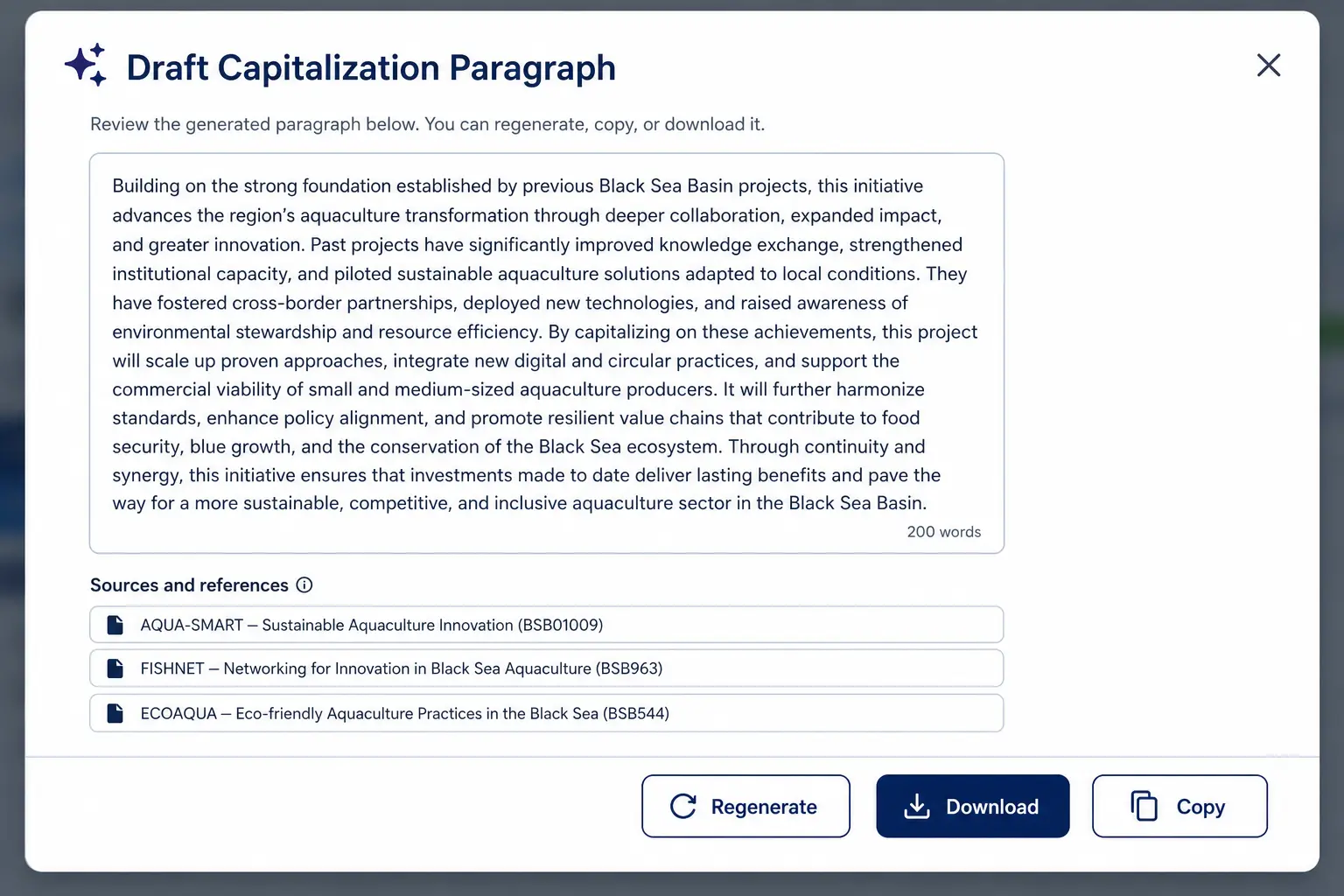
Reading the evidence drawers is great for understanding why a project is relevant. But writing the actual "Capitalization on previous BSB projects" section of your concept note still takes time, synthesizing three projects into smooth prose, getting the citations right, making sure the paragraph flows.
Now the platform does that for you. Once you have at least three scored results and your proposal title and objectives are filled in, a "Draft capitalization paragraph" button appears above the list. One click sends the top three matches to Gemini 3 Flash with a structured prompt, and returns a 200–300 word draft that:
- Opens with a sentence connecting your proposal's objectives to the Black Sea Basin Programme's legacy
- Devotes one paragraph to each of the top three projects, quoting actual results text
- Closes with a forward-looking statement about how your work builds on those foundations
- Includes proper citations (acronym, title, call identifier)
The dialog that opens lets you copy the paragraph straight to your clipboard, download it as a .txt file with a references block, or regenerate if the tone isn't right. You can also edit the text directly in the dialog before copying.
This turns a 45-minute writing task into a 10-second click.
The Sibling Tabs: Partners, Projects, Network
Capitalization is one of four tabs on the Search Results page, and the other three are designed to be read together with it. The same query that produces a capitalization list also fans out into a partner list, a project list and a network graph, so you can move from "which past projects should I capitalize on?" to "who actually delivered them and who else is in their orbit?" in a single workflow.
Partners tab
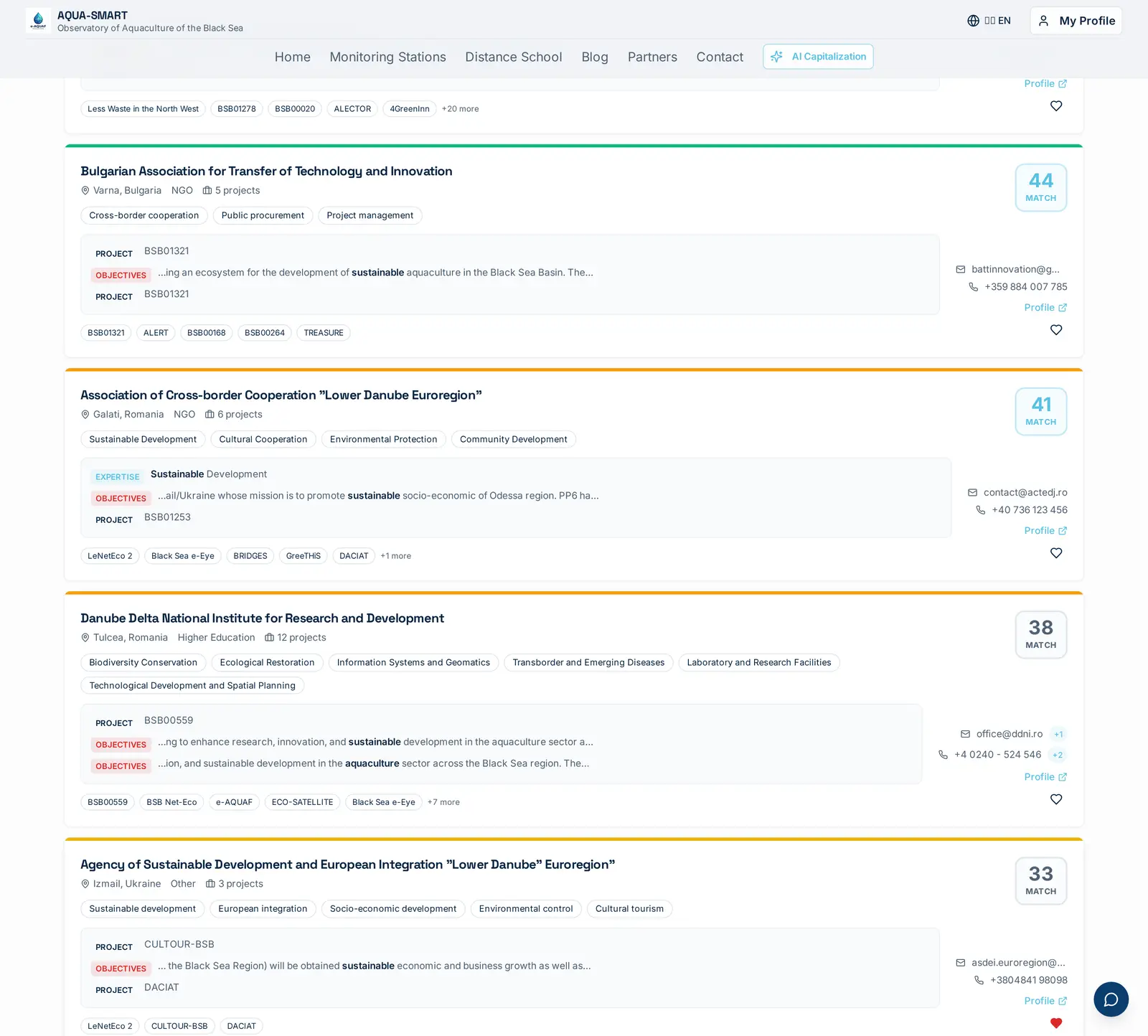
The Partners tab returns up to 100 organisations whose expertise, project history or stated objectives match the query. Each card pairs an organisation with its strongest evidence snippet, an EXPERTISE line, an OBJECTIVES line, and the project ID where the match was found, plus direct email and phone. The same MATCH score (0–100) appears top-right, computed against the same query stem the capitalization engine uses, so a high-scoring partner and a high-scoring past project usually share the same DNA.
Projects tab
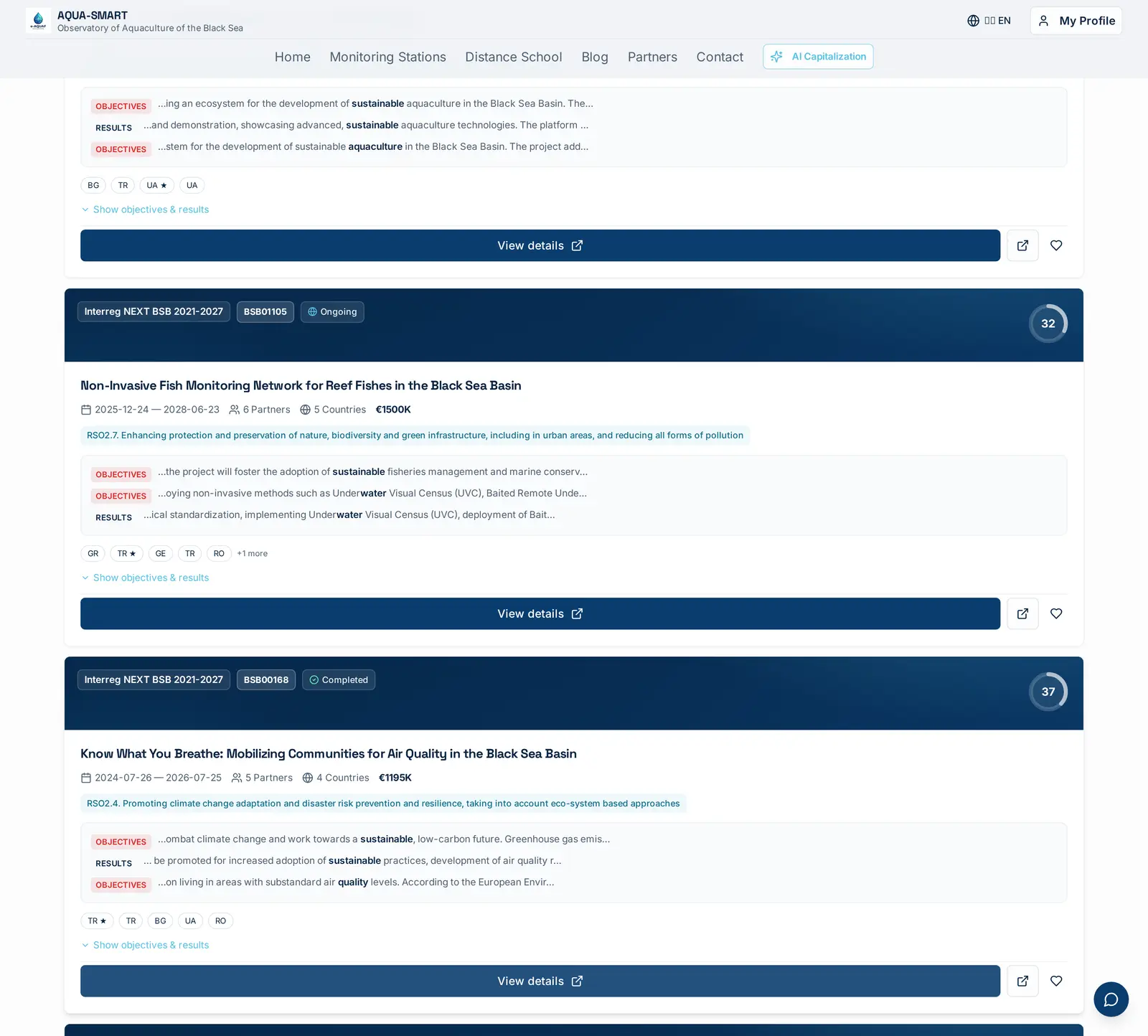
The Projects tab is the close sibling of Capitalization, with a slightly different emphasis: it surfaces past projects ranked by overall thematic fit rather than capitalization-specific signals (no acronym bonus, no Featured weighting). Use it when you want to read project history broadly, what was funded in this space?, and switch to Capitalization when you're ready to write the "Building on previous results" paragraph. Both tabs share the same underlying recall stage; the difference is only in how the evidence is weighted and presented.
Network tab
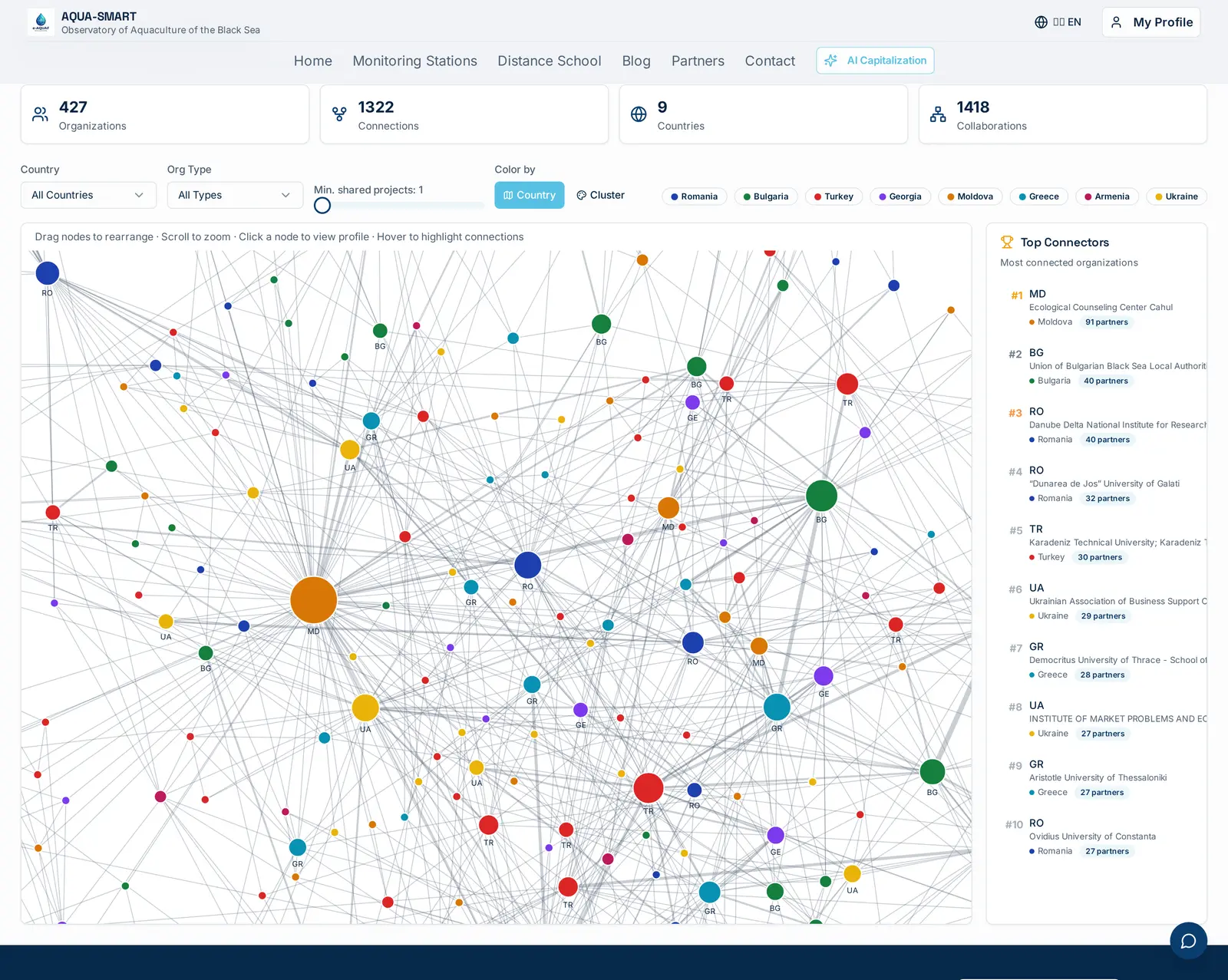
The Network tab steps back from any single query and shows the Collaboration Network, every BSB organisation as a node, every shared project as an edge. Today: 427 organisations, 1,322 connections, 1,418 collaborations across 8 countries. Nodes are scaled by partnership count and coloured by country or cluster; the Top Connectors panel surfaces the most central hubs. Drag, zoom, click a node to jump straight to its partner profile. The map view answers a different question than capitalization: not "what was built?" but "who knows whom?", useful for building a consortium around an anchor partner you've identified.
From a Match to a Real Partner
A high capitalization score on a past project is only useful if you can reach the people who delivered it. The Partners workspace is the bridge.
Partner Directory
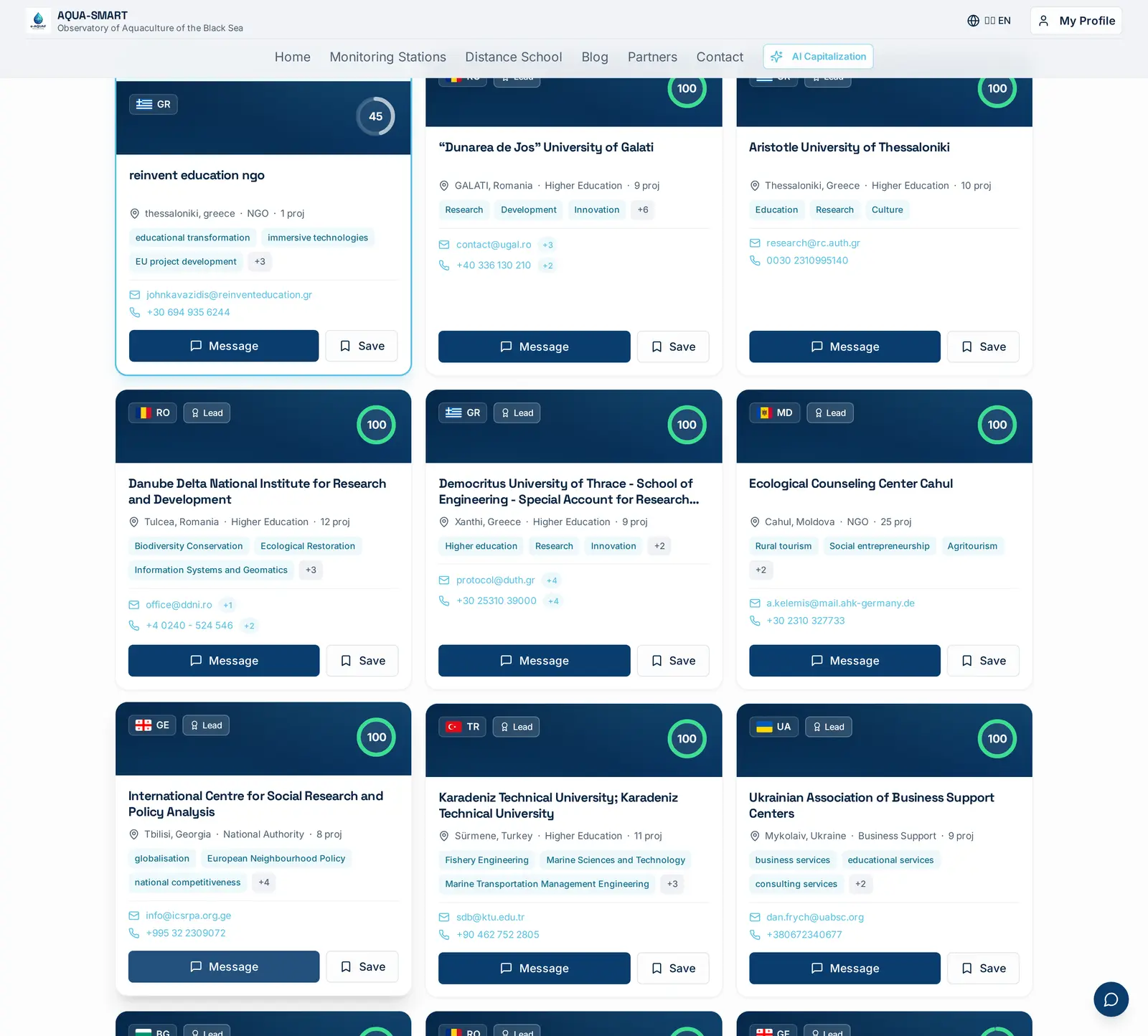
The standalone Partners page (top navigation) is a directory of every organisation indexed by the platform, 477 at the time of writing, with country, type (university, NGO, public authority, SME) and lead-partner badge filters. Each card shows the organisation's project count, expertise chips and full contact block. Search by name, scope by country, and click through to a profile in one motion.
Partner profile
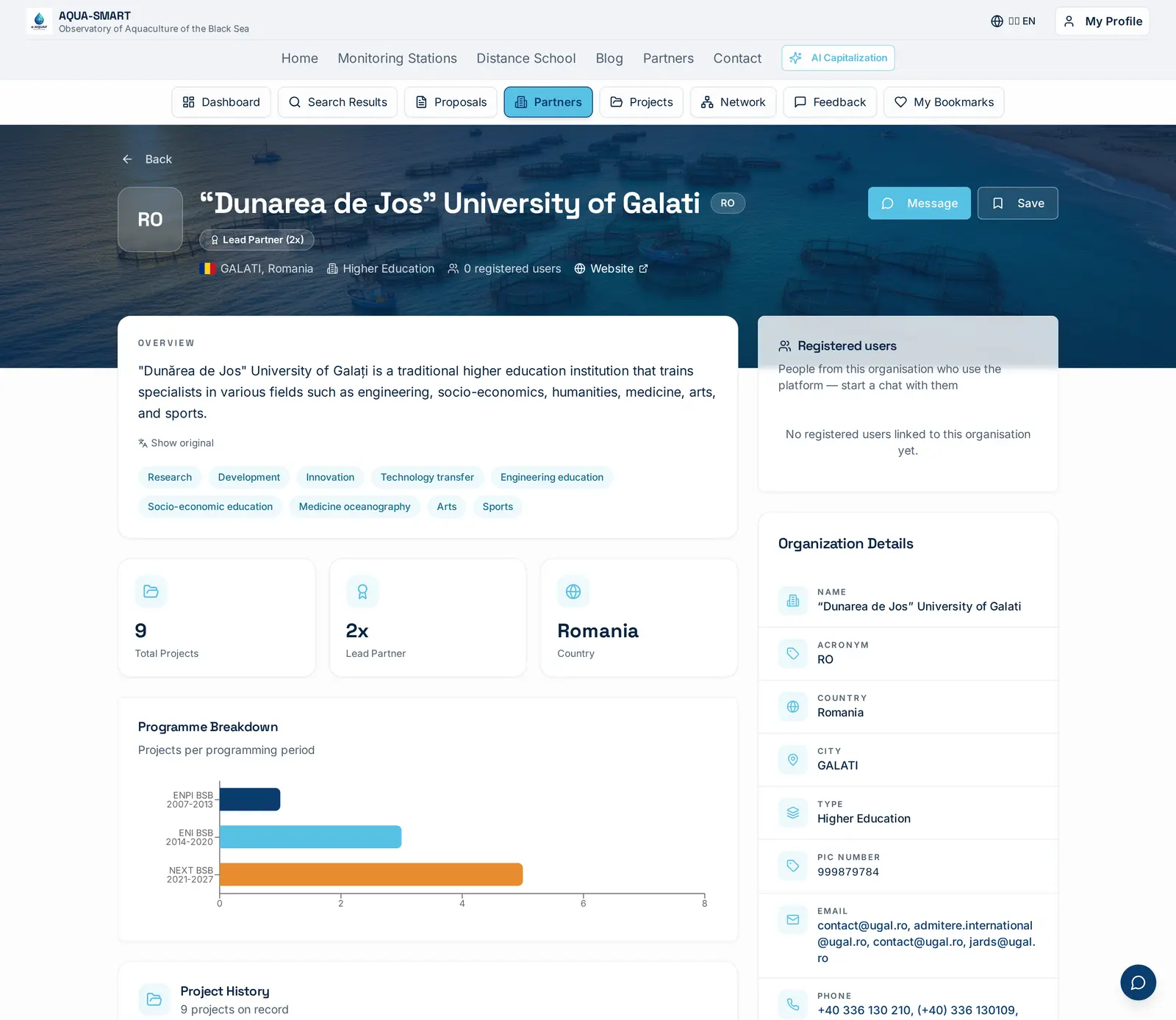
Each profile is a one-page brief: localised overview, expertise tags, totals (total projects, lead-partner count, country), the programme breakdown showing how many projects were delivered under each programming period, and a full contact block, emails, phones, website and the PIC Number (Participant Identification Code) you need for any EU funding application. From here you can also see which past projects the organisation delivered, jump to those project sheets, and bookmark the partner for later.
End-to-End: Capitalize Inside a Proposal
The most powerful use of capitalization isn't on the standalone Search Results page, it's inside the Proposals workspace, where the engine is wired directly to the concept note you're drafting.
Here's the end-to-end flow on a real example. Open Proposals → New Proposal and define a project idea, "e-AQUAF Smart Aqua Farming follow-on", an aquaculture water-quality monitoring extension. Pick a thematic priority (SO 2.2, biodiversity and green infrastructure), set target countries to Bulgaria and Romania, set partner-type and consortium-size requirements, and hit Next.
The AI Matching step then runs the same multi-signal scoring pipeline the Capitalization tab uses, but blends in three additional dimensions: thematic alignment with the SO you picked, geographic coverage against your country set, and direct capitalization signal, "is this partner already inside a past project we should be capitalizing on?"
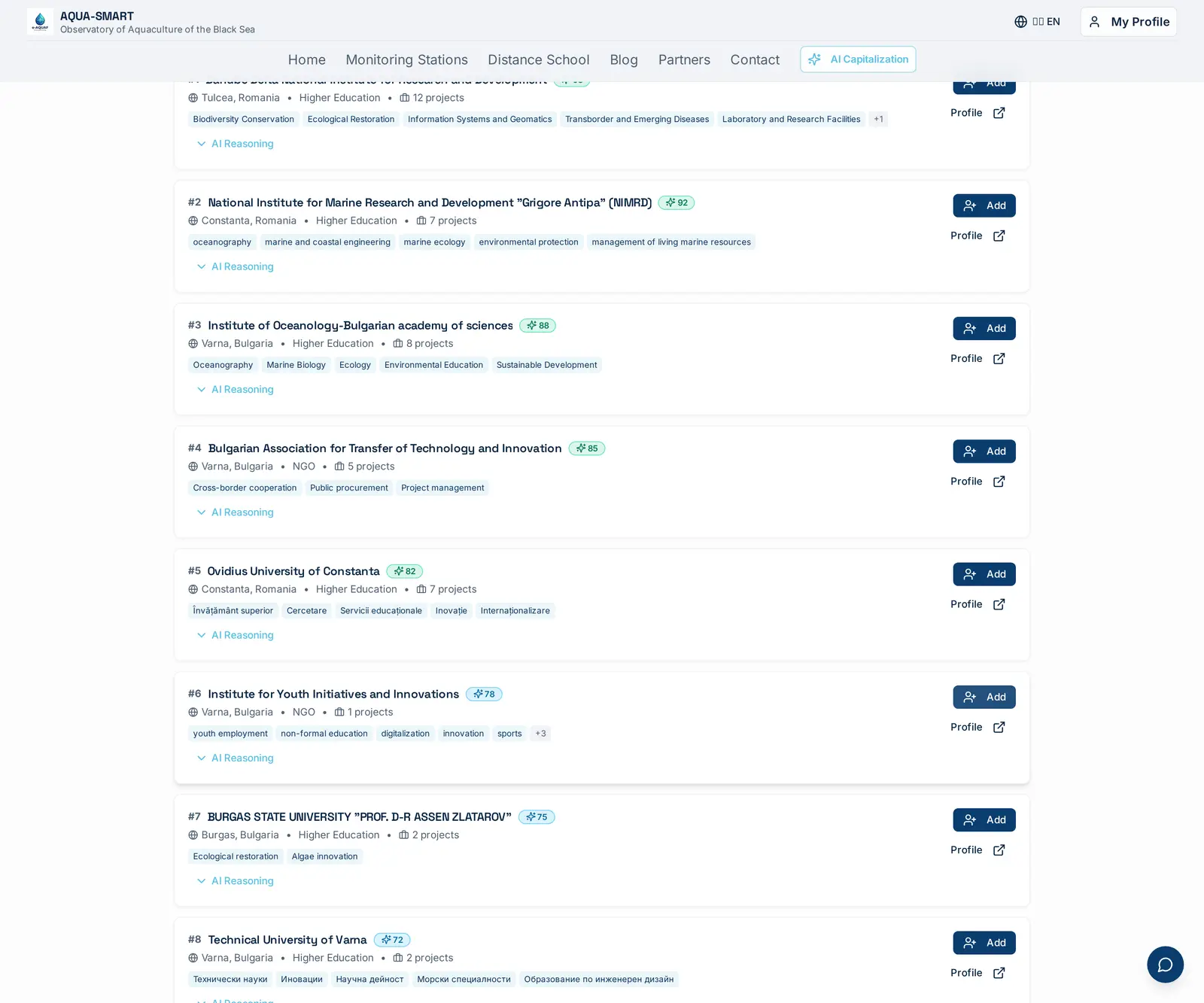
In the screenshot the engine returns 15 partners ranked from 98 down. Batumi Shota Rustaveli State University (Georgia) lands at #1 with a score of 98, and the AI Reasoning drawer explains exactly why:
Direct capitalization: Currently a partner in the e-AQUAF project, ensuring seamless integration of previous results.
Highest thematic match: Extensive experience in RSO1.1 (Advanced technologies) and RSO2.7 (Nature protection/pollution reduction).
High capacity: Managing 6 BSB projects with a substantial cumulative budget across research and innovation.
That first line is the capitalization engine talking. Because the source proposal mentions e-AQUAF in its title, every organisation listed as a partner on BSB01009 (the e-AQUAF grant agreement) gets a direct capitalization boost, and the model writes a plain-language sentence explaining the boost rather than just adding points silently.
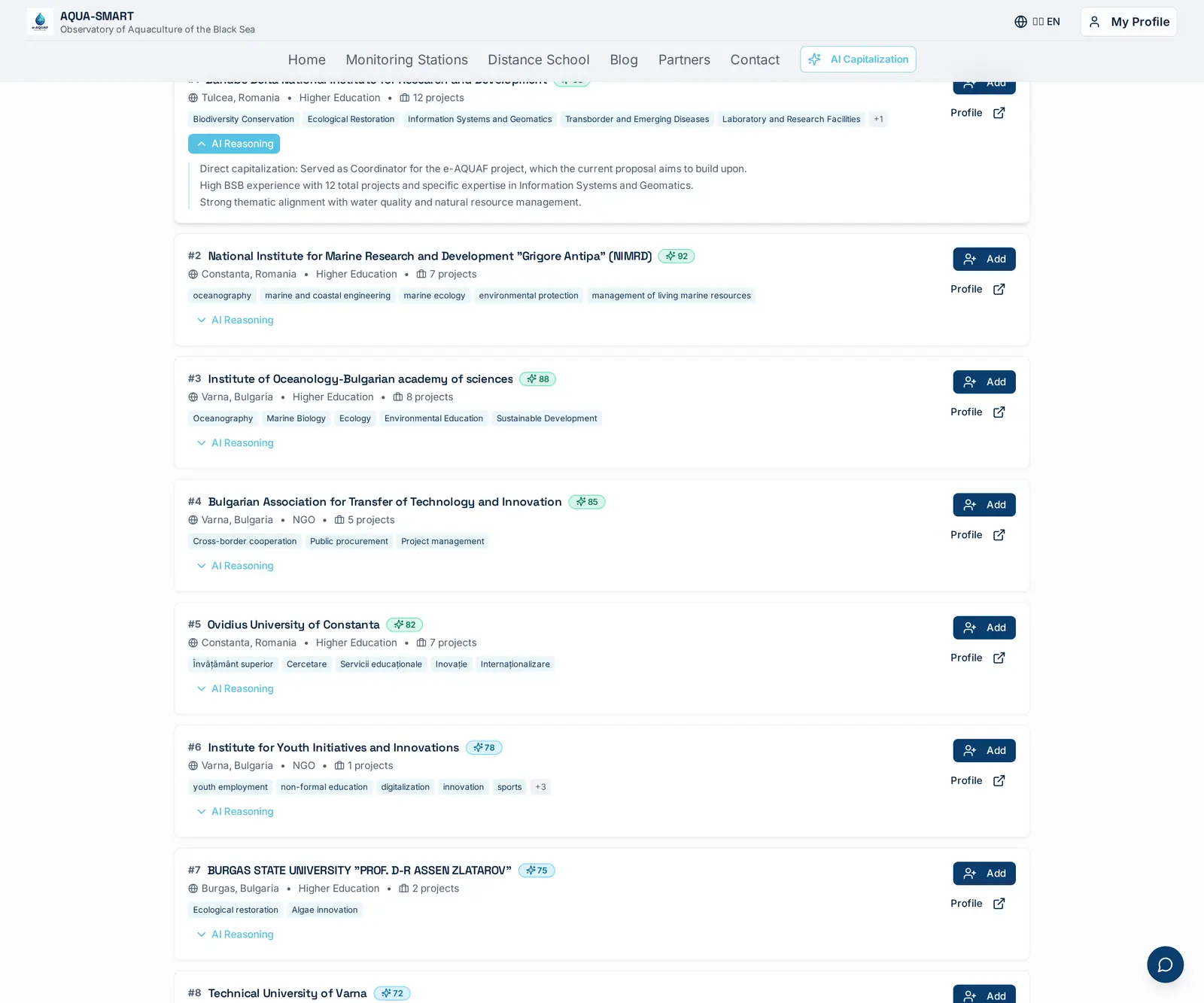
The same logic applies further down the list: "Dunărea de Jos" University of Galați (#2, score 92) and other former BSB consortium members surface for the same reason, they're already inside the body of work this new proposal claims to build on, so picking them is the structurally honest move. Click Add on the cards you want; the chosen organisations become your proposal's consortium, and the Find Projects for Capitalization button right above the list pre-fills the Capitalization tab with the same query, so the "Capitalization on previous BSB projects" paragraph and the partner list both come from the same evidence base.
Where to Find It
The engine surfaces in two places:
- Search Results → Capitalization tab. The fastest path for one-off scans. Type a query in the main search bar, hit Search, click the Capitalization tab. The number badge on the tab shows how many past projects scored above the relevance threshold.
- Proposals workspace → sidebar. When you're actively drafting a proposal, the Capitalization panel sits alongside your concept note. It auto-feeds from the proposal's title, objectives and thematic tags, no need to re-type the query, and refreshes as you edit.
What's Coming
One major expansion is on the roadmap:
- Cross-programme capitalization. Today we only score against Black Sea Basin Programme projects. Next we'll fold in Horizon Europe, EMFAF and DG MARE thematic projects that AQUA-SMART has already indexed.
Try It
Open the AI Capitalization quick action in the top navigation, type a one-line description of your idea, and read the Why capitalize? drawers on the top 5 hits. Watch for the sparkle badge that means semantic re-ranking is active, and try the Draft capitalization paragraph button when you're ready to write. Two minutes of reading there will save days of database trawling, and your proposal's "Building on previous results" section will write itself.
Co-funded by Interreg NEXT Black Sea Basin Programme · Developed by Re:Invent Education.
The responsibility for the content of this material is that of the author(s). The content does not necessarily represent the official position of the European Union.

Interreg NEXT Black Sea Basin Programme — Co-funded by the European Union
Download the AQUA-SMART app